

Published: · 10 min read
You've tried the paper planners. You've tried the Google Sheets workaround. You've probably tried typing "lesson plan" into ChatGPT and gotten something that looked promising but needed an hour of editing to make usable.
A purpose-built teacher lesson planner is different. The best ones understand standards, grade levels, and what an actual classroom day looks like. Whether you're looking for a lesson plan app on your phone, the best digital planner for teachers who live in Google Docs, or a full AI planning suite, this guide compares 5 options with honest pros and cons so you can pick the right one without wasting a free trial on the wrong tool.
What to Look for in a Digital Lesson Planner
Not every tool calling itself a "lesson planner" does the same thing. Before you commit to one, here's what actually matters.
Standards alignment. The planner should know your state standards (Common Core, TEKS, NGSS, or whatever your district requires). If you have to manually type in standard codes, the tool is creating work, not saving it.
Output quality you can actually teach from. A plan that reads like a college essay isn't a plan. You need clear objectives, timed activities, differentiation notes, and materials lists. The less editing you do after the tool generates output, the better.
Export and integration. Where does the finished plan go? If you live in Google Docs, the tool needs to export there. If your district uses Canvas or Schoology, check for LMS integration before you sign up.
Privacy compliance. If your school district is evaluating tools, FERPA and COPPA compliance aren't optional. Some tools collect zero student data (like Diffit), while others store interaction histories for analytics. Know what your district requires.
Quick Comparison: All 5 Planners at a Glance
Tool
Best For
Standards
Lesson Planning
IEPs
Differentiation
Grading/Feedback
Lernico
Full AI Teacher Assistant
Yes (all 50 states)
Yes
Yes
Yes
Yes
MagicSchool AI
Broad AI toolkit
Yes
Yes
Yes
Limited
No
Eduaide.ai
Deep resource generation
Yes
Partial (build from parts)
No
Limited
No
Diffit
Reading level adjustment
Yes
No
No
Yes (best in class)
No
Brisk Teaching
Google Docs users
Yes
Yes
No
Limited
Yes
1. Lernico
Most AI teaching tools pick one thing and do it well. Lesson plans here. Differentiation there. IEP goals somewhere else. That means you end up with 3-4 subscriptions, 3-4 logins, and zero connection between the outputs.
Lernico is the only tool on this list that covers the entire instructional workflow (plan, differentiate, assess, generate IEP goals, build rubrics, adjust reading levels, and provide grading feedback) in a single platform built specifically for K-12. Check the comparison table above: it's the only row with "Yes" in every column.
What it does well. Every other tool on this list works the same way: you open it, you describe what you need, it generates something, you edit. Every time. From scratch. Lernico works differently.
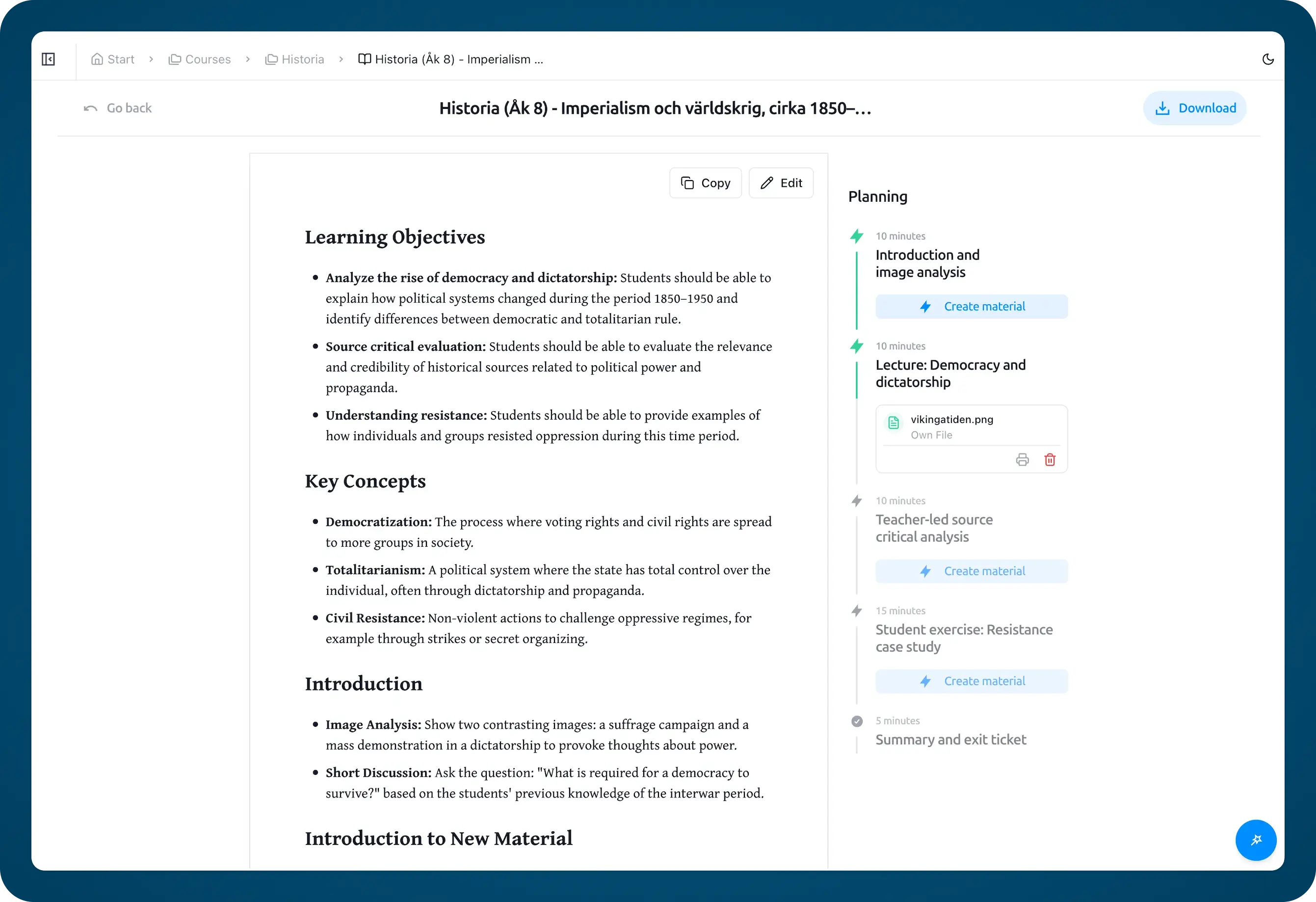
You set up your courses, your students, and your standards once. After that, Lernico plans your lessons ahead of time. Before you even open the app, you log in and a draft lesson plan is already waiting for you. Standards-aligned. Differentiated for the reading levels in your class. IEP accommodations already built in for the students who need them. You review it, adjust what needs adjusting, and you're ready to teach.
No prompting. No configuring dropdowns for every single generation. No describing your lesson from scratch every Monday morning. The AI understands the context of your courses and your students, and it uses that context every time, so each plan builds on what came before.
That alone makes it different. But the full workflow goes further. From the same interface, without switching tools, you can also:
- Generate measurable IEP goals by disability category and grade level, with the depth that special education teachers actually need
- Create rubrics calibrated to your specific lesson objectives, not generic templates
- Adjust any passage to a different reading level (the same thing Diffit specializes in, built in as a core feature)
- Generate study guides and quiz questions tied to the lesson you just planned
- Get AI-powered grading feedback on student work
Everything stays connected. Your rubric matches your lesson plan. Your differentiated materials align with your IEP goals. Your assessment questions target the exact standards you taught. Nothing is siloed.
Teachers in pilot programs report cutting weekly planning time from 3+ hours to under 45 minutes. Not because any single feature is dramatically faster. It's because you're not starting from a blank page every time, and you're not copy-pasting between 4 different platforms.
Who it's best for. Every K-12 teacher who's wished ChatGPT actually knew their classroom. Lernico is your personal teaching assistant. It knows your courses, your curriculum, your standards, and your students. It builds your planning and grading workflow around you, not the other way around. Whether you teach 3rd grade ELA or 11th grade AP Chemistry, whether you have 5 students with IEPs or none, it adapts to your reality. If you've ever typed a detailed prompt into a generic AI tool and thought "I shouldn't have to explain all this every time," Lernico is the fix.
2. MagicSchool AI
MagicSchool is the largest AI platform built for education, with over 5 million educators using it and partnerships with more than 13,000 schools and districts. If you've heard of one AI teaching tool, it's probably this one.
What it does well. MagicSchool offers 80+ AI-powered tools covering lesson planning, but rubric generation, quiz creation, IEP writing, email drafting, text scaffolding, and more. The lesson plan generator takes your grade level, subject, standards, and topic, then outputs a structured plan you can export to Google Docs or Microsoft Word. The platform also includes student-facing tools, which means one subscription covers both teacher prep and classroom use.
Where it falls short. Having 80+ tools sounds impressive until you're searching through them to find the one you need. The sheer breadth means no single tool goes as deep as a specialist. The lesson plans it generates are solid starting points, but teachers who want highly specific outputs (like plans that integrate your existing curriculum materials or follow a particular instructional framework) may find themselves editing more than expected. And because each tool operates independently, your rubric doesn't automatically match your lesson plan. You're still connecting the dots yourself.
Who it's best for. Teachers who want one platform for everything: planning, assessments, communication, and student tools. Also strong for districts evaluating a single vendor solution, since it states that it is SOC 2 certified and FERPA/COPPA compliant — confirm the current status with the vendor.
3. Eduaide.ai
Eduaide takes a different approach: instead of one lesson plan generator, it offers over 100 distinct educational resource types. Need a bell ringer? A graphic organizer? A Socratic seminar plan? Each has its own generation tool.
What it does well. The depth of resource types is hard to beat. Eduaide is built by a teacher-founder with 36 years of education experience, and it shows in the output quality. The platform supports document uploads, so you can feed it your existing curriculum materials and get outputs that reference your actual content, not generic suggestions. The workspace lets you refine, differentiate, and organize everything you generate.
Where it falls short. The learning curve is steeper than MagicSchool. With 100+ resource types, new users can feel overwhelmed trying to find the right one. There's no single "generate a complete lesson plan" button. You build your lesson by combining multiple resource types, which gives you more control but takes more time.
Who it's best for. Experienced teachers who want granular control over their materials and don't mind spending a few extra minutes to get higher-quality, more customized outputs. Particularly strong for teachers who already have curriculum they want to build on, not replace.
4. Diffit
Diffit doesn't try to do everything. It does one thing exceptionally well: turning any content into differentiated, leveled resources that meet students where they are.
What it does well. Paste an article URL, upload a PDF, or drop in a YouTube link, and Diffit rewrites it at your chosen reading level, from 2nd grade through 12th grade. Along with the adapted text, it generates vocabulary lists, comprehension questions at multiple DOK levels, and discussion prompts. The exports go straight to Google Docs, Slides, Forms, or Microsoft 365. In a survey of 2,517 teachers, 96% reported that Diffit saves them time.
Where it falls short. Diffit is a differentiation tool, not a full lesson planner for teachers. It won't generate a complete lesson plan with objectives, activities, and assessments. It won't write IEP goals. It won't build rubrics. If you need a start-to-finish plan, you'll need to pair Diffit with another tool, and stacking separate subscriptions for each gap adds up fast.
Who it's best for. Teachers in mixed-ability classrooms, ELL specialists, and anyone who regularly needs the same content at 3 different reading levels. It's a best available specialist, not an all-in-one.
5. Brisk Teaching
Brisk is a Chrome extension that works inside the tools you already use: Google Docs, Slides, and your LMS. No new platform to learn. No new tab to open.
What it does well. The installation is instant: add the extension, and Brisk appears in your browser toolbar. From any Google Doc, you can generate lesson plans, rubrics, quizzes, exemplars, and sub plans without leaving the page. Because it works inside your existing documents, the outputs land exactly where you need them. Brisk also has a "curriculum intelligence" feature rolling out that embeds your district's adopted curriculum into the AI, so outputs match your actual pacing guide.
Where it falls short. As a browser extension, Brisk depends on Chrome. If your school uses Firefox or Edge, you're out of luck. The tool works best for teachers already deep in the Google ecosystem. If your district is Microsoft-first, the integration advantage disappears. And because it's lightweight by design, it can't match the depth of standalone platforms like Eduaide for complex resource generation.
Who it's best for. Google Workspace teachers who want AI help without switching platforms. If you plan in Google Docs and assign through Google Classroom, Brisk fits into your day without any disruption.
Which Digital Lesson Planner Should You Pick?
It depends on what problem you're actually solving, and how many problems you're solving at once.
If you only need one thing: Pick the specialist. Diffit for differentiation. Brisk for Google Docs integration. Each one is excellent at its specific job.
If you want the deepest resource library and don't mind a learning curve: Eduaide.ai has 100+ resource types and the most control over output quality.
If you want a personal teaching assistant that actually knows your classroom: Lernico works differently from every other tool on this list. The tools above are generators. You prompt them, they output something, you edit it.
Lernico is an all-in-one personal teacher assistant. It understands the context of your students and courses, remembers what you've taught, and plans your lessons ahead of time. You don't write prompts. You don't configure settings for every generation. You open the app, and a draft is already waiting for you. Standards-aligned, differentiated, with IEP accommodations already built in for the students who need them. You review it, adjust what needs adjusting, and you're done. Lesson plans, IEP goals, rubrics, differentiation, reading-level adjustment, and grading feedback, all in one connected workflow where every output is informed by everything else. No switching tools. No copy-pasting between platforms. No starting from scratch every time.
For teachers who want to spend their mornings teaching instead of prompting an AI tool, that's the difference that matters.
Frequently Asked Questions
What is the best free lesson planner for teachers?
MagicSchool AI offers the most generous free tier, with unlimited AI generations and access to core tools. Brisk Teaching is completely free for individual teachers with no generation limits. If you're looking for a teacher planner app with AI built in, MagicSchool's free tier is the best starting point. For zero-friction Google Docs integration, Brisk wins.
Will AI replace teacher lesson planning?
No. AI generates drafts. You bring the professional judgment. The tools in this guide produce solid starting points: structured plans with objectives, activities, and assessments. But they don't know your students' names, your classroom dynamics, your co-teacher's schedule, or what bombed last Tuesday. The value is in cutting draft time from 30 minutes to 3, so you spend your planning energy on adaptation rather than creation.
How much time do AI lesson planners actually save?
Most tools claim 50-70% time savings on planning tasks. Concrete data is limited, but MagicSchool reports teachers save up to 10 hours per week on administrative work overall (not just planning). Pilot data from other platforms shows planning time reduced from 3+ hours/week to under 45 minutes. The real savings depend on how much you currently plan from scratch versus adapting existing materials. Teachers who plan everything from blank documents see the biggest gains.
Start Planning Smarter This Week
You don't need 5 tools. You probably don't even need 3. You need one assistant that knows your students, your standards, and your schedule, and has your lessons ready before you even open the app.